Founding operators · 3 setup slots
Run your vent cleaning businessfrom your phone.
Online booking with deposits, two-way texting, on-site invoicing, and a schedule with the route built in. Built for dryer vent, air duct, and chimney cleaning companies — by a working operator who runs his own company on it every day, set up privately for yours.
$750 white-glove setup · $129/month · Jobber migration included · no contract · free live demo, no signup
Live product — shown with demo data.
Who VentCRM is for
Built for companies like yours
- Dryer vent cleaning companies
- Air duct cleaning companies
- Chimney cleaning and sweep companies
- Small route-based home services — appliance repair, gutter cleaning, similar trades
- Owner-operators and teams of roughly one to five trucks
An honest word: probably not for you if you need
- Enterprises that need payroll built in
- Warehouse or parts inventory management
- Dispatching hundreds of technicians
VentCRM is deliberately lean — the day-to-day of a small route business, done really well. If you’re bigger than that, I’d rather say so now than after a demo.
Built on real jobs, not in a boardroom
I’m Eyal, the owner of Vent Pro NYC — a family-owned dryer vent cleaning company in Brooklyn. For years we ran on big-name field service software, paying for enterprise features we never opened while the things a small crew touches every hour lived behind upsells.
So I built exactly what my own company needed: booking, scheduling, texting, invoicing, payments — every screen shaped on real driveways and real basements, none of the bloat. My company runs on it every single day, and when our old platform closed our account this August, we didn’t lose a single job — the replacement was already better than what it replaced. The screenshots on this page are the real product.
Now I set it up for a few other operators: your own private copy, your data in your own database, migrated in by someone who knows exactly what a day in this trade looks like.
A day in the truck, screen by screen
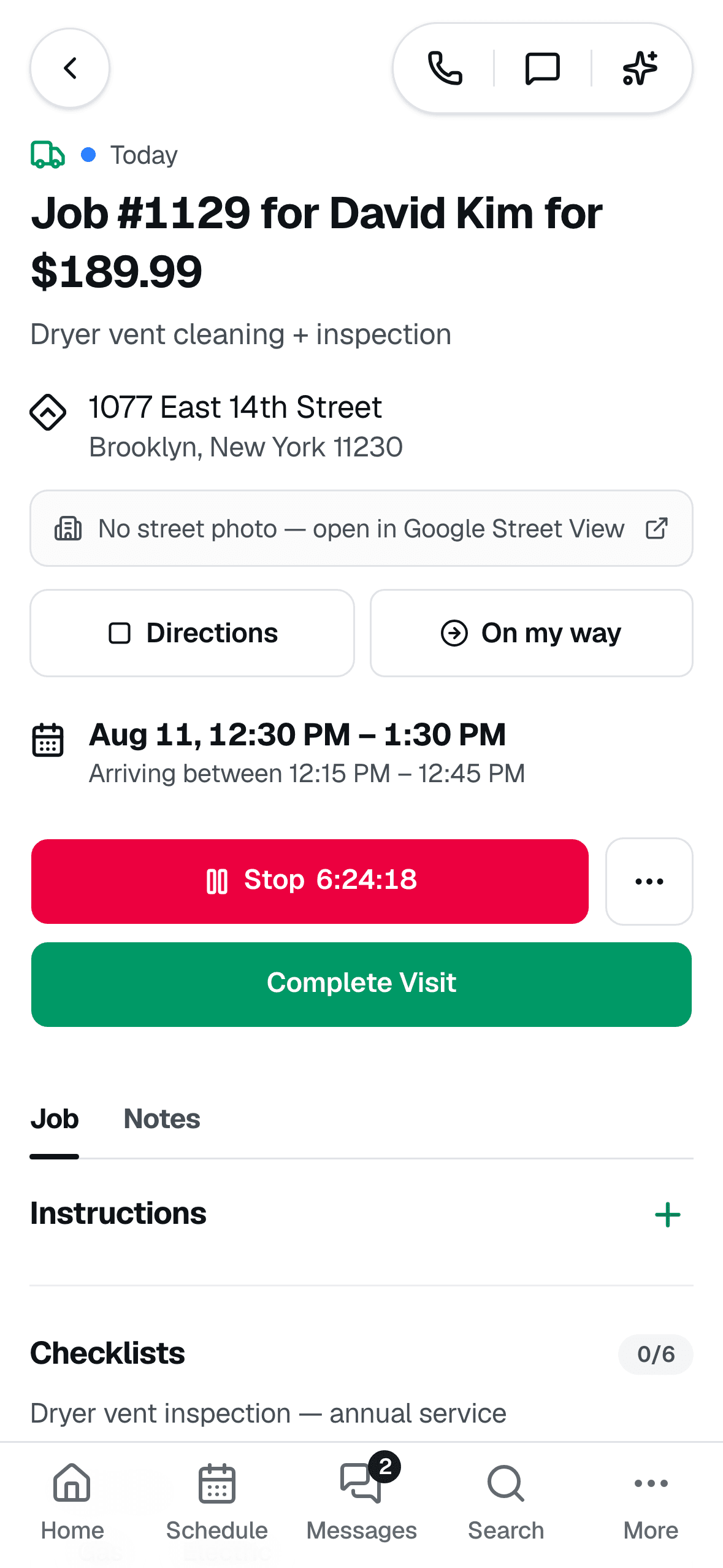
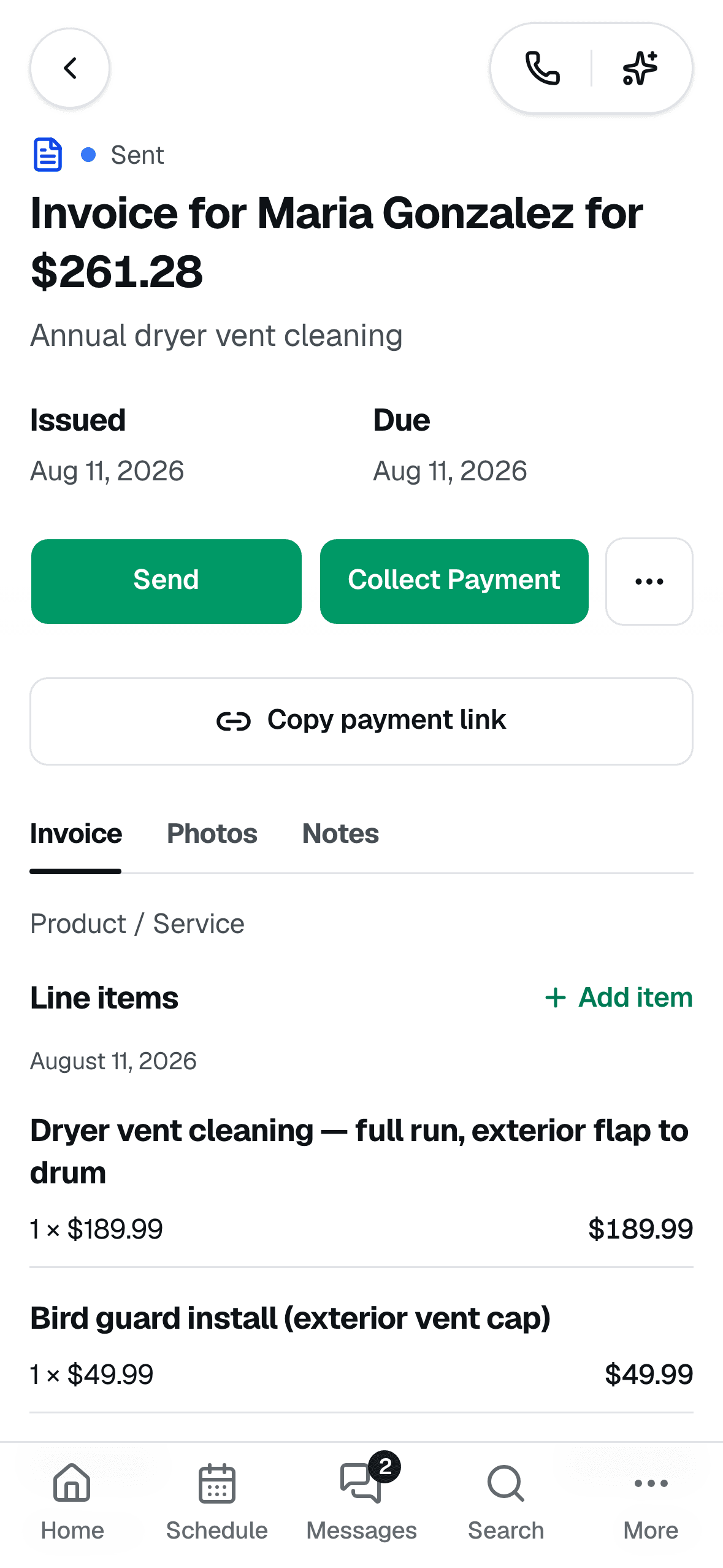
Every screenshot below is the live product running on demo data — the same system Vent Pro NYC uses on real jobs every day.
Your day on one screen
Open the app and see today's visits, what they're worth, who still owes you, and what needs action — then clock in and go. No laptop, no office stop.
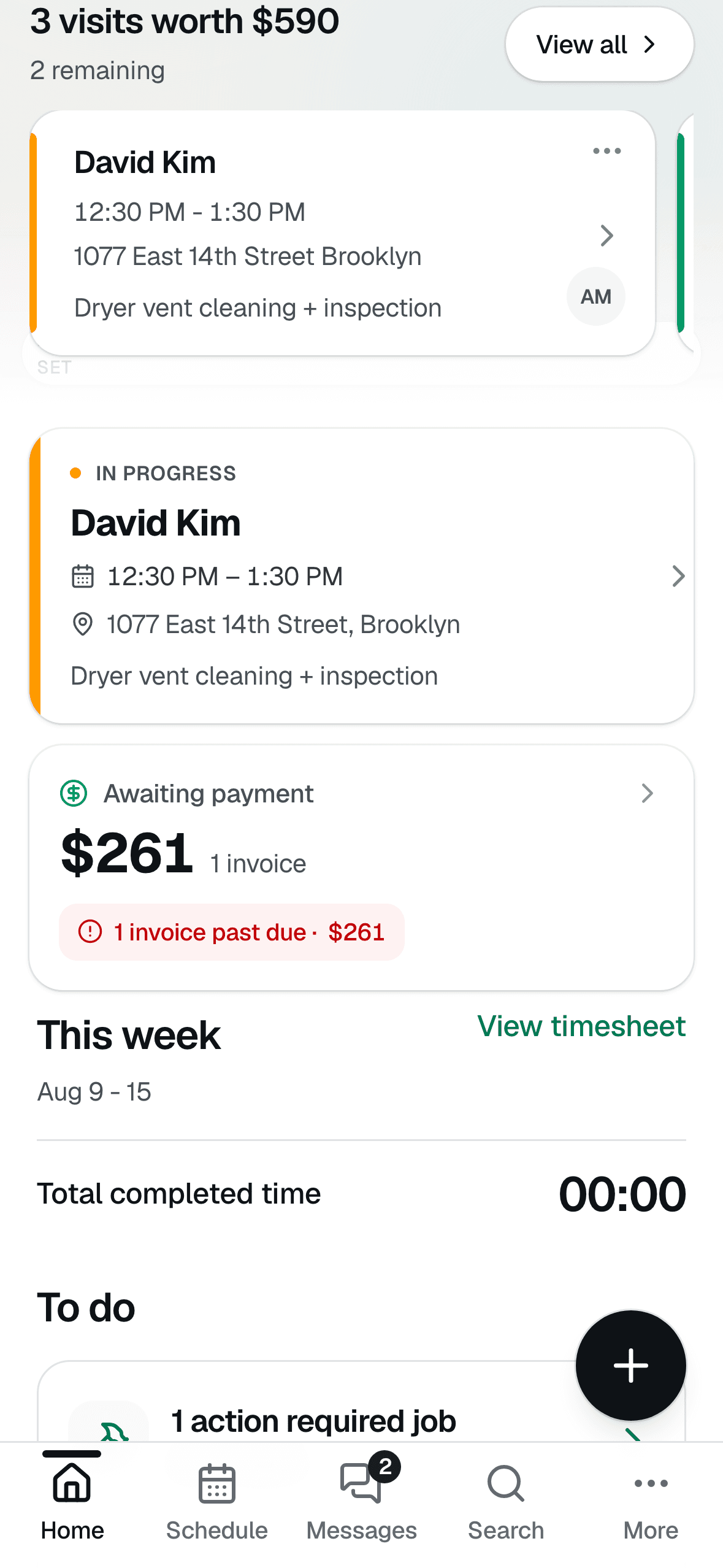
A schedule that plans the route
Day, list, and map views with the drive built in — order today's stops by time or shortest drive and hit Start navigation. Every job also carries GPS directions and a Google Street View photo of the building, so you never circle the block.
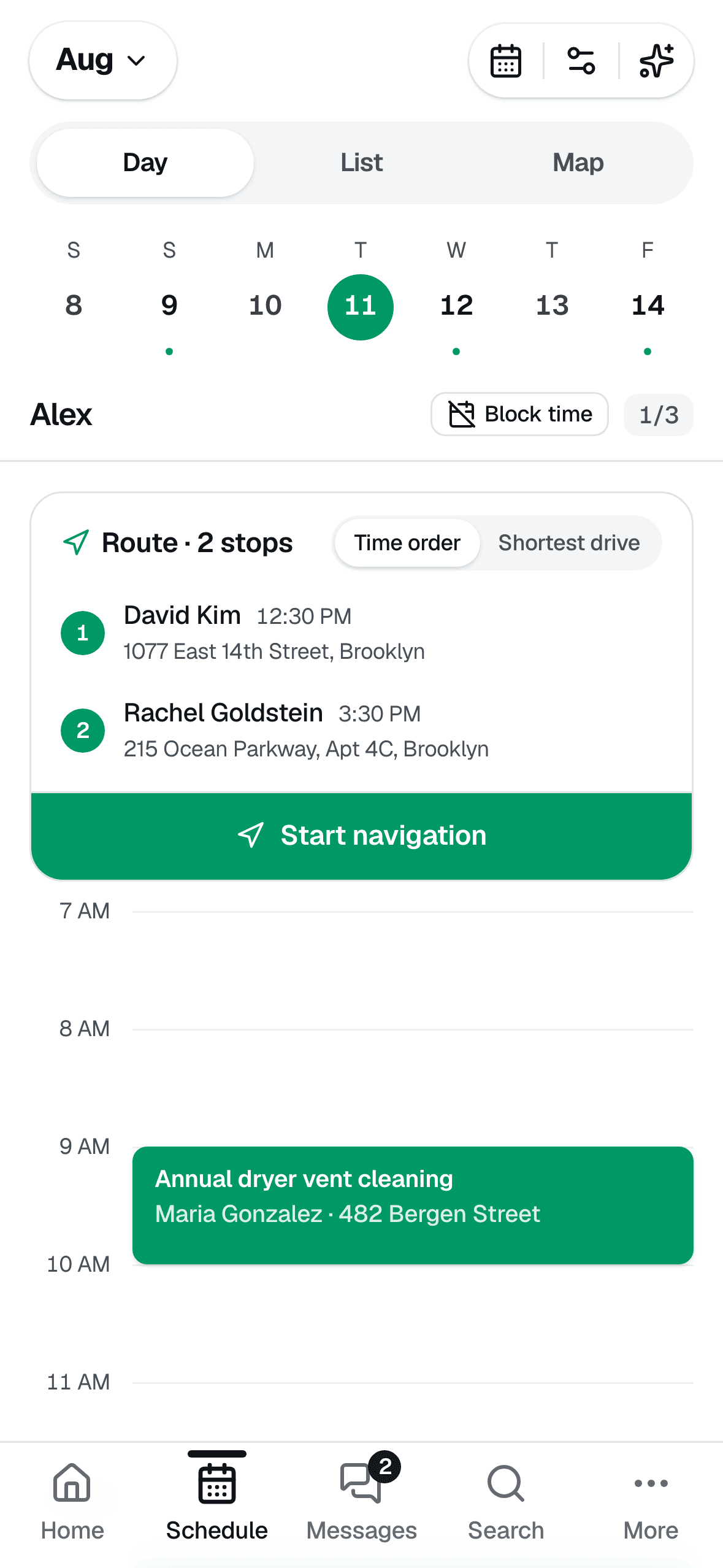
Invoice from the driveway
Turn the finished job into an invoice with line items and tax, then collect on the spot — card, payment link, or text it over. Cash, check, Zelle, and Venmo get recorded too, and card payments can carry a tip.
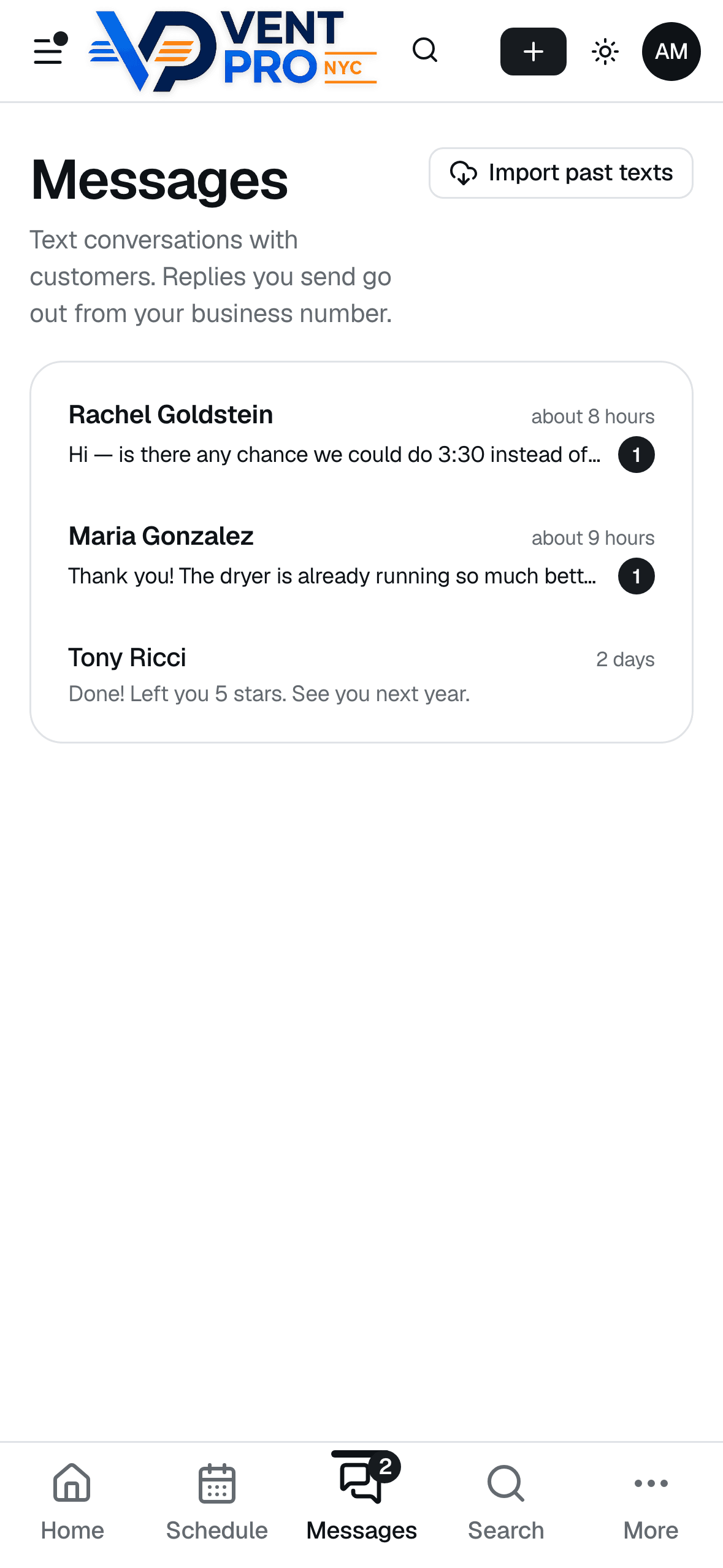
Real two-way business texting
Confirmations, on-my-way texts, and reminders go out automatically from your business number — and when customers text back, replies land in one inbox with unread badges, not your personal phone.
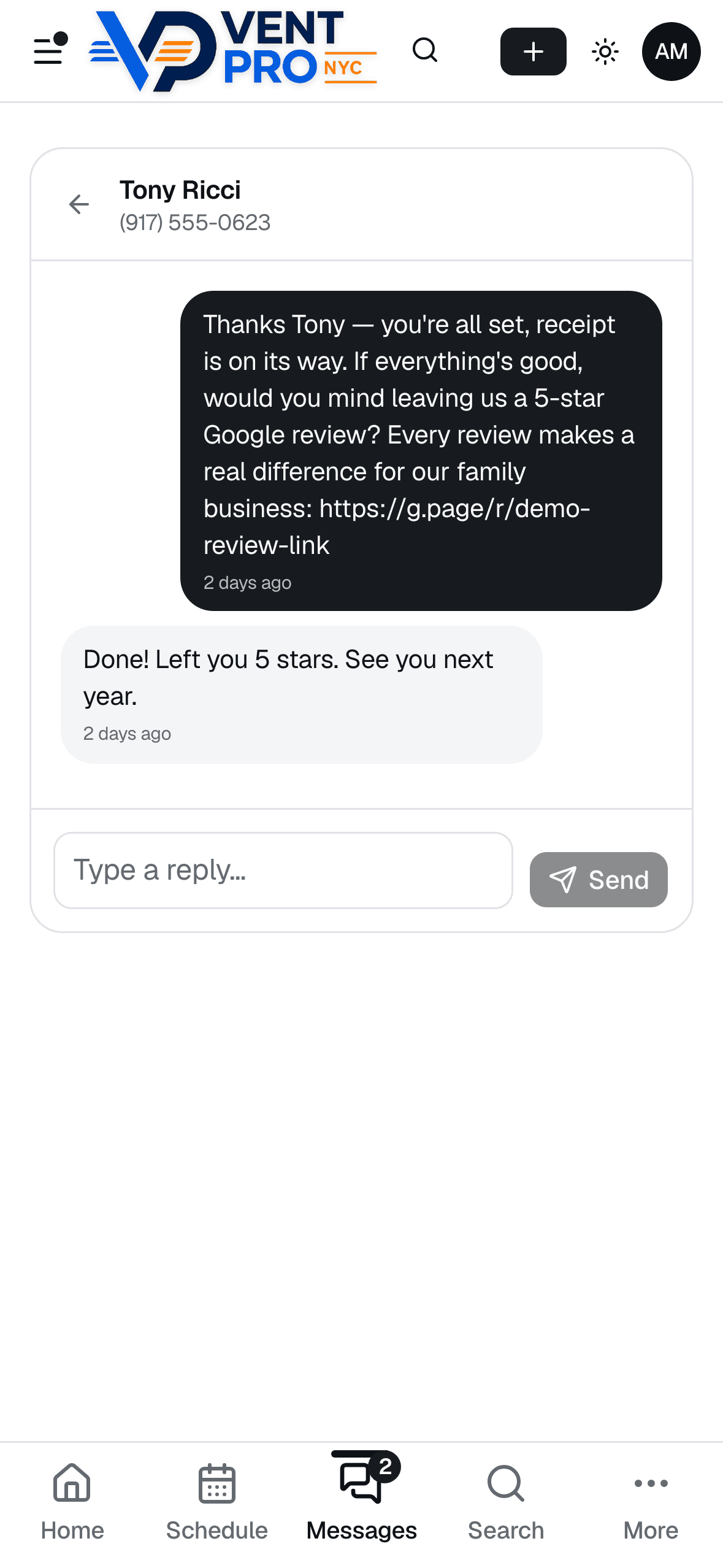
Google reviews on autopilot
The moment an invoice is paid, the system texts your customer a thank-you with your Google review link — automatically, or with one tap from their profile whenever you prefer. Reviews stop depending on you remembering to ask.
What your customer sees
The half of the system your customers touch is what wins the next job — receipts with photo and airflow proof, and quotes they can approve from the couch.
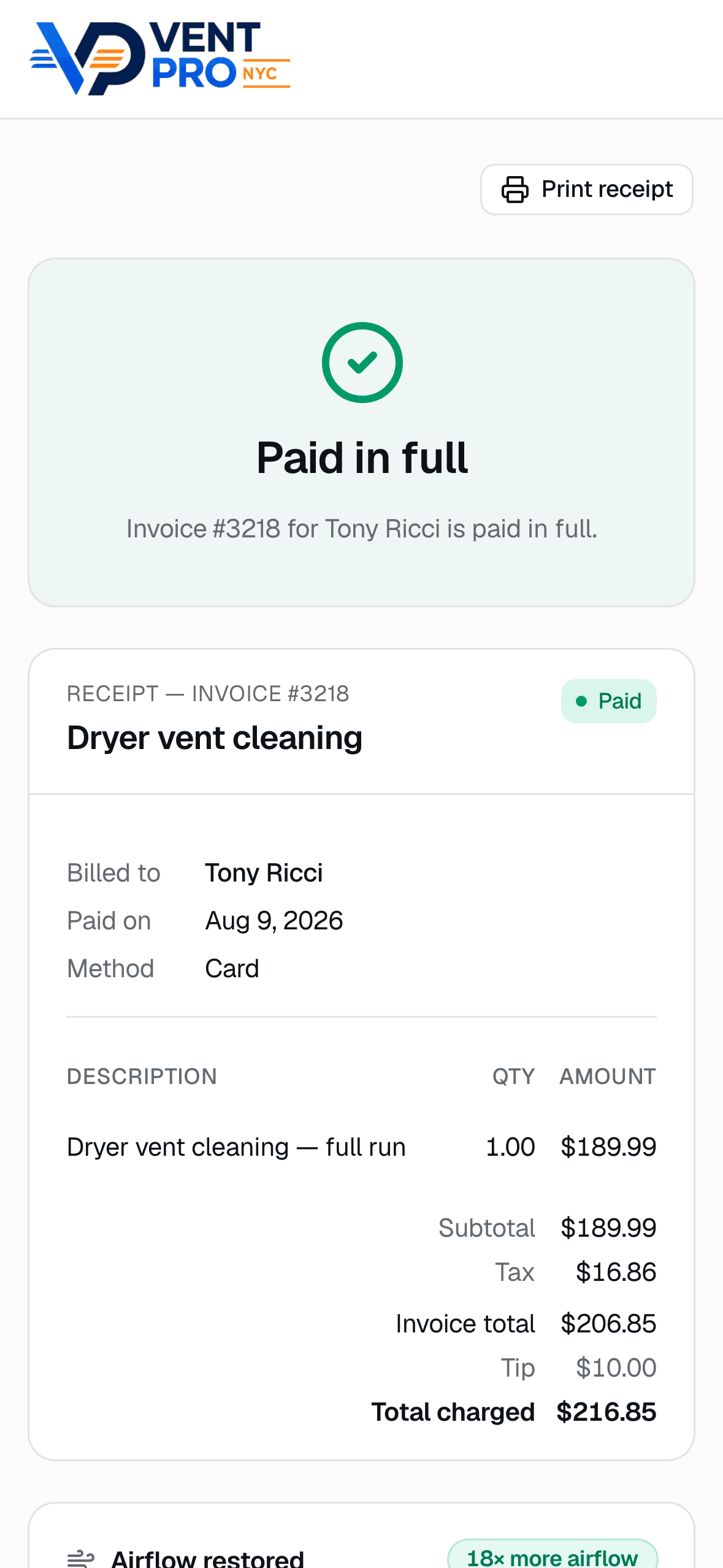
A receipt that closes the loop
Paid in full, itemized, with tip — pulled up from a link in their text messages, no login. It reads like a receipt from a company ten times your size.
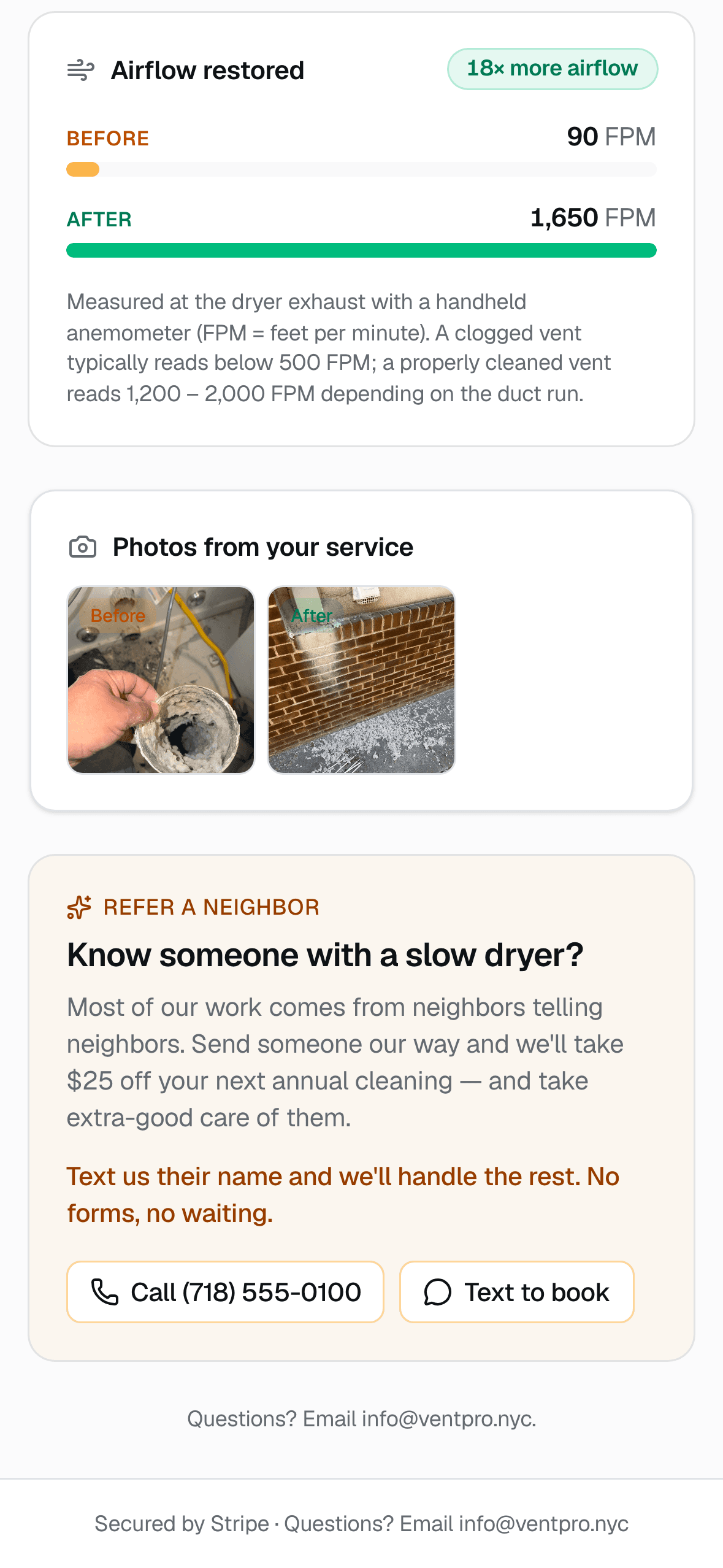
Proof of work, not promises
Every receipt can carry before/after photos, video from the visit, and the airflow readings you measured — 90 FPM in, 1,650 FPM out, “18× more airflow.” Customers screenshot this and send it to their neighbors.
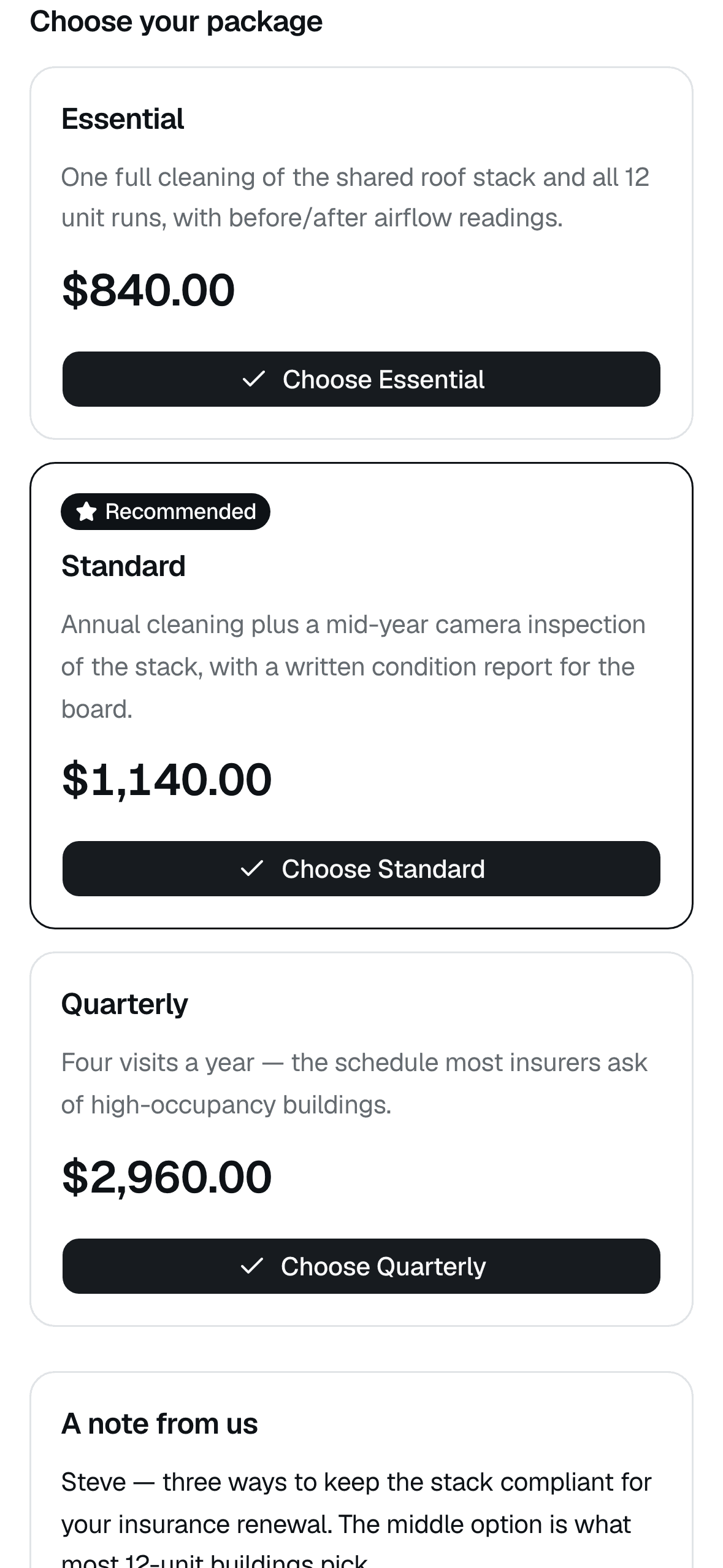
Quotes customers approve from bed
Send a link with up to three tiers — Essential, Standard, Quarterly — with one marked Recommended. They tap a button, you get notified, the job is won. No PDFs, no printing, no chasing.
Want to see it running your kind of day?
And a real office on the desktop
For the evenings when you do sit down at a computer.
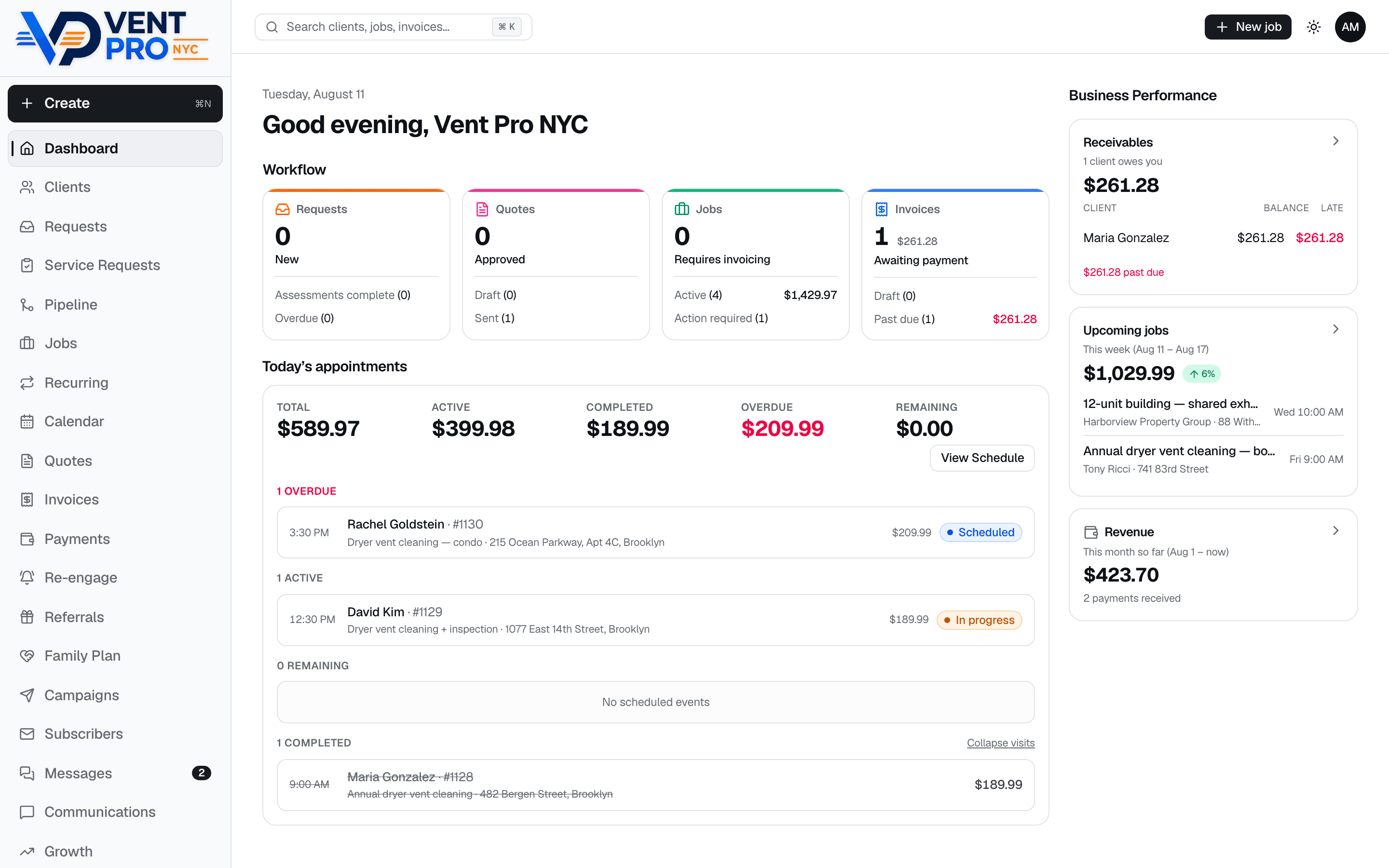
The whole business on one screen
Receivables with who's late, this week's pipeline, month-to-date revenue, and today's appointments with live statuses.
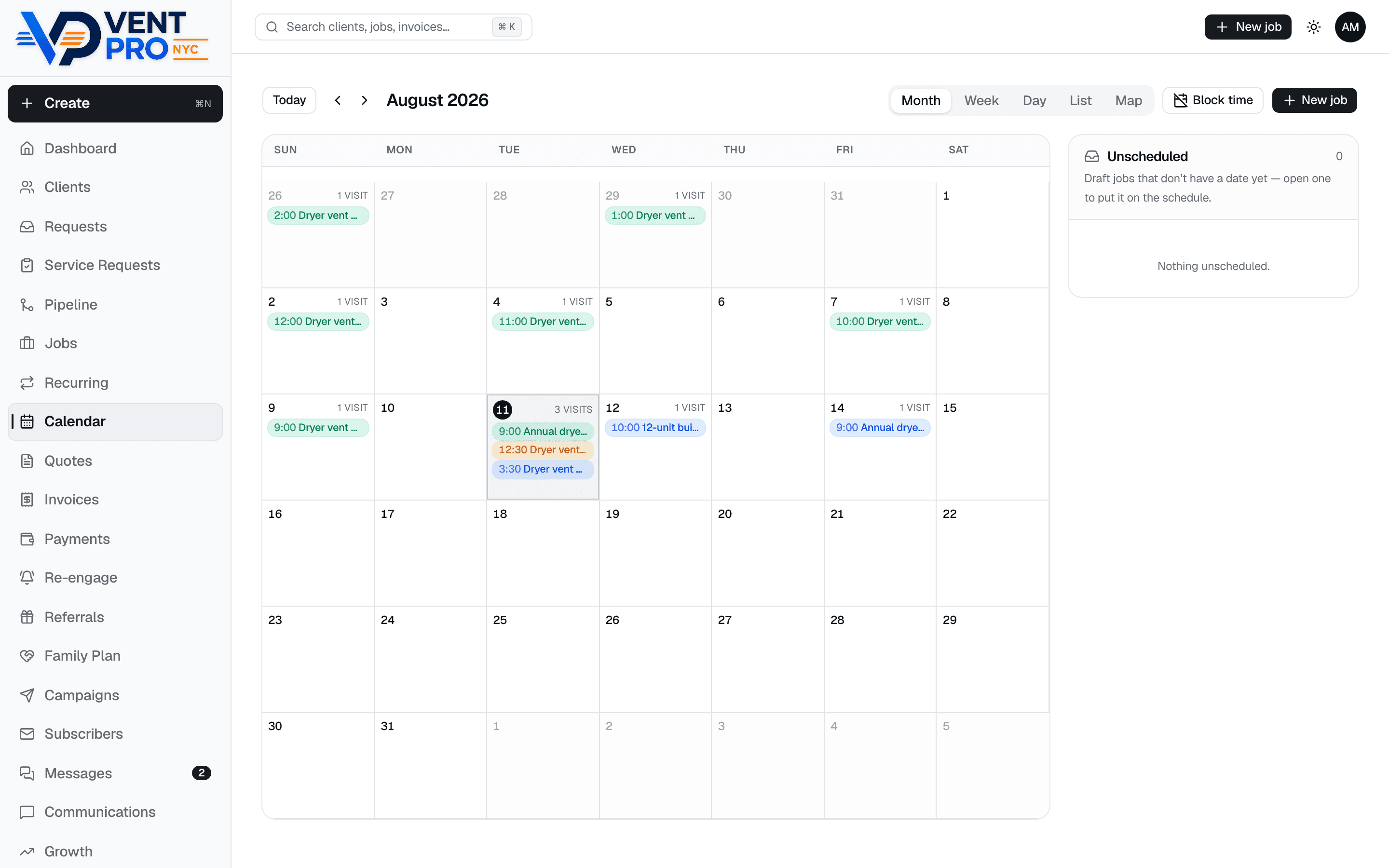
A calendar that runs the month
Month, week, day, list, and map views, color-coded by status, with drafts parked in an Unscheduled tray until you slot them.
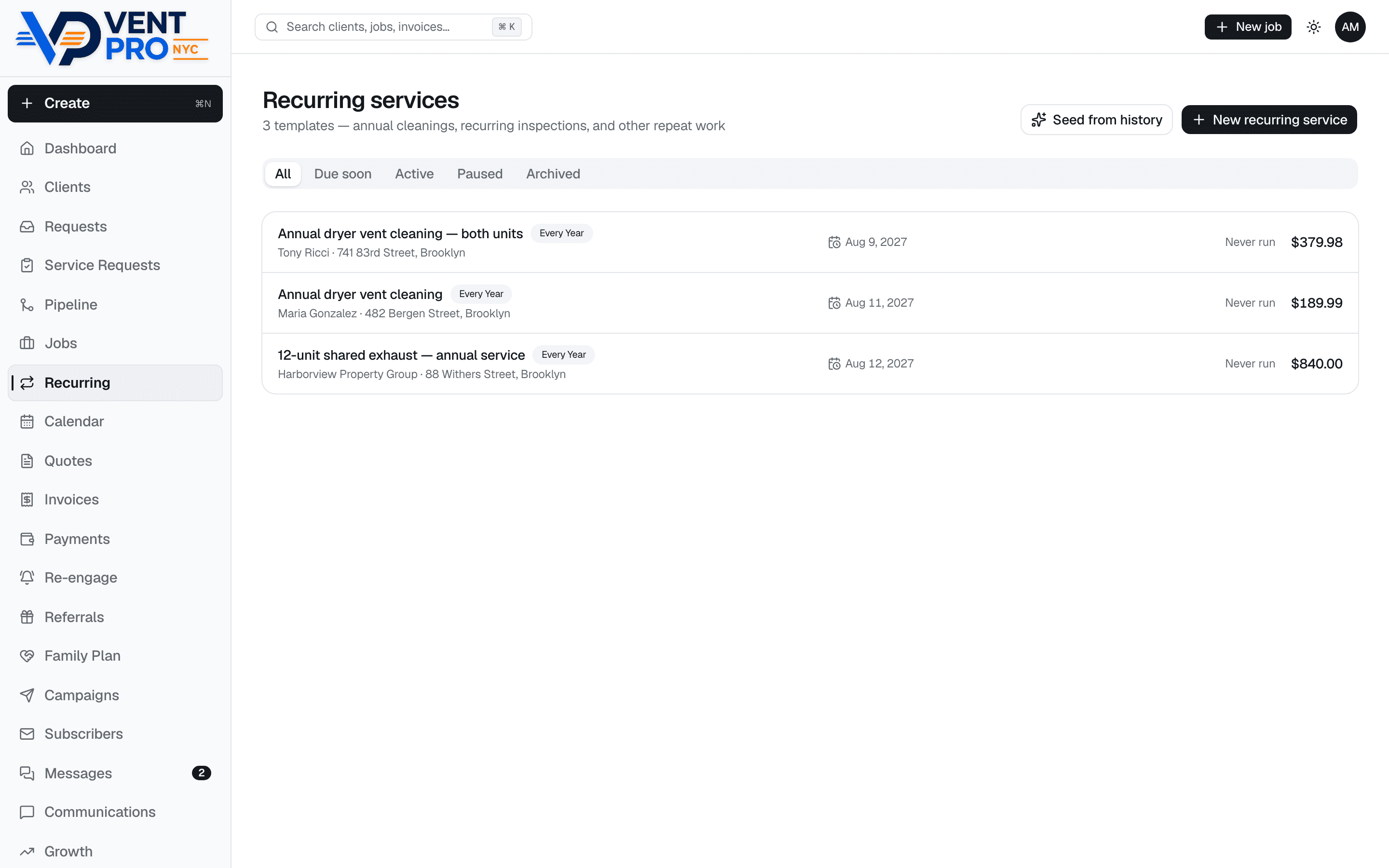
Annual re-booking on rails
Vent cleaning is a yearly service — every finished job can arm next year's template, and reminders go out on their own 30 days before it's due. Your customer list quietly refills your calendar.
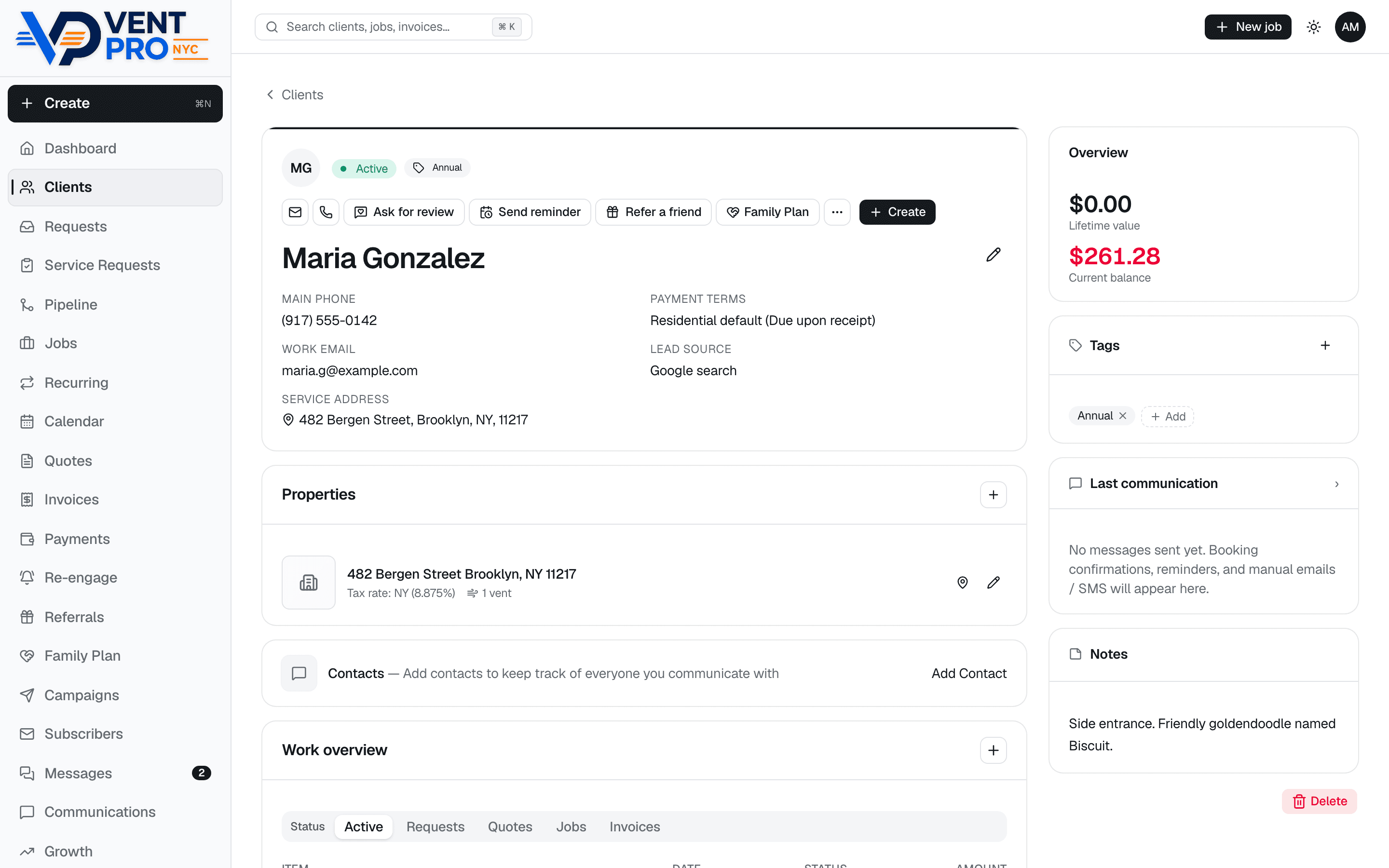
Customer records that make you look sharp
Gate codes, dog names, roof access, lifetime value, tags, notes, and every job, quote, and invoice — plus one-tap Ask for review, Send reminder, and Refer a friend right from the profile.
And the list keeps going
Everything below is built and running today — no roadmap asterisks.
- Online booking on your website, with a $50 deposit through Stripe so slots stop being held for free
- Automatic day-before appointment reminders by text and email
- One-tap “On my way” texts with your ETA
- Google review request texted automatically after every paid invoice — or sent manually with one tap
- Before/after photos AND video attached to jobs and shown on customer receipts
- Airflow readings (FPM) before and after, with a “restored 18×” badge customers understand
- Google Street View photo, GPS directions, and gate/access notes on every job
- Good/better/best quotes customers approve from a link — no PDFs
- E-signed service agreements with a signature pad, stored per job
- On-site inspection checklists, ported from the routine you already run
- Annual re-booking templates with automatic “time for your cleaning” reminders
- Payment recording for card, cash, check, Zelle, and Venmo — with tips on card payments
- Stripe payout tracking: fees, net amounts, and when money lands in the bank
- Automatic payment reminders for overdue invoices, throttled so they never nag
- Client records with lifetime value, tags, dog notes, and full history
- Technician logins with limited access — schedule and same-day invoices only
- Push notifications for new bookings, replies, and payments
- Installs as an app on iPhone and Android — no app store needed
- Referral links, campaigns, and a needs-attention feed for jobs that stall
- Your data exports to CSV anytime — it's yours
Proven on real jobs, every day
VentCRM isn’t a prototype looking for users — it’s the system Vent Pro NYC, a working Brooklyn dryer vent cleaning company, runs its entire operation on: every booking, every visit, every invoice, every text. The founder is a real operator you can look up, not a landing page.
Your customers. Your data. Your system.
Every statement below reflects how the product is actually built — nothing aspirational.
- Your own private system
- Every VentCRM operator gets their own deployment with its own dedicated Postgres database — not a row in a shared platform. Your customer list is physically separate from every other company's, including mine.
- You own your customer data
- Your customers, jobs, invoices, and message history belong to your business. VentCRM (operated by Vent Pro NYC, Inc.) processes it only to run your system — it is never sold, shared, or used to market to your customers.
- Export it yourself, anytime
- Clients, invoices, leads, and Stripe payout history export to CSV from inside the app — self-serve, no permission needed. This is built and working today, not a support request.
- Cancel and keep everything
- No contract. If you cancel, you get a complete export of your data, and your deployment and database are then deleted. You'll never be held hostage by your own customer list — that's why this product exists.
- Where your data lives
- In your own Postgres database on Neon, hosted on AWS in the United States, with the app served over HTTPS on Vercel.
- Who can get in
- Owner sign-in is session-based; there are no shared passwords. Technician logins are limited in server code to the day's schedule and same-day invoices — they can't browse your client list, revenue, or settings.
- Cards are Stripe's job
- Payments run through your own Stripe account on Stripe's hosted payment pages. Card numbers are entered with Stripe and never touch or get stored in VentCRM, and payouts land directly in your bank.
- Texting on a real business number
- Two-way SMS runs on Twilio through a number registered to your business during setup (that registration is why the texts deliver). Getting your customers' consent to text them remains your responsibility — the built-in booking forms include the opt-in checkboxes.
The fine print versions live in the privacy policy and cancellation & data export policy.
Founding operator pricing
I onboard every founding operator personally — white-glove setup, a direct line to me, and a say in what gets built next. The $750 setup covers all of this:
- Private VentCRM setup — your own system on your own domain
- Your logo and business customization
- Your services and prices loaded
- Customer and job migration
- Jobber migration when applicable
- Stripe connection so you can take cards and send payment links
- Business texting number registered the right way, so texts deliver
- Your booking rules and service area configured
- A walkthrough on your phone, on a call with me
- Direct support from me after — no ticket queue
Founding operator
$129/month
plus a one-time $750 white-glove setup. Hosting, updates, and support included. Text-message usage billed separately at cost; card processing through your own Stripe account at Stripe’s standard rates. No contract — cancel anytime and keep your data.
There’s no self-service checkout on purpose — I talk with every founding operator before taking a dollar. Not sure yet? Try the live demo first — no signup, nothing permanent.
Questions operators actually ask
- Can I try it before paying anything?
- Yes — demo.ventcrm.com is a live copy of the real product running a fictional Brooklyn company. You're signed in automatically, on your phone or desktop: open the schedule, run the visit screen, poke at invoices and the texting inbox. Nothing you do there is permanent (the sandbox resets itself daily), and nobody asks for your email.
- What happens during the 15-minute demo?
- A call with Eyal — the founder, not a sales team. Tell me how you run your day and I'll walk the same workflow through the system: a booking coming in, the visit screen on the truck, the invoice, the payment, the review request. Bring questions about your setup and your data. No payment is taken on the call; I want to make sure it actually fits before you spend a dollar.
- How long does setup take?
- Setup is white-glove: you send your logo, services, prices, and your customer list (or your Jobber export), and I build the system for you and walk you through it on a call — you need a phone and about an hour. You'll get a concrete timeline for your business on the demo call.
- Can you migrate my Jobber customers and jobs?
- Yes. Migrating out of Jobber is built in — customers, jobs, and invoices — because that's exactly the migration my own company went through. Setup includes it. Coming from spreadsheets or another system works too: if you can export it, I can load it.
- Will I lose my information if I cancel?
- No. There's no contract, and cancellation comes with a complete export of your data — customers, jobs, invoices, and message history. You can also export your customers, invoices, and leads to CSV from inside the app yourself, any time, without asking anyone.
- Can I export my data?
- Yes, self-serve: clients, invoices, leads, and Stripe payout history all export to CSV from their screens in the app. On cancellation you also get a complete export of everything. Your customer list is yours — that's the whole point of having your own system.
- Does it work on iPhone and Android?
- Yes. VentCRM is a web app tuned hard for phones — the mobile screens are the primary product, not an afterthought. It runs in Safari or Chrome on any modern iPhone or Android, and on any desktop browser.
- Do I need to download an application?
- No app store, no downloads, no updates to install. Open your system's web address and add it to your home screen — it installs like an app, icon and all, and updates itself. The walkthrough call covers this; it takes about a minute.
- Can technicians have limited access?
- Yes. A technician login sees the day's schedule, the visit screens, and same-day invoicing — not your client list, revenue numbers, or settings. The restriction is enforced on the server, not just hidden in the menu.
- Does VentCRM send real two-way text messages?
- Yes — booking confirmations, day-before reminders, on-my-way texts, review requests, and payment receipts go out from a real business number registered to your company (that registration is part of setup — it's why the texts actually deliver). When customers text back, replies land in an inbox in the app with unread badges, not on your personal phone.
- Who owns the Stripe account?
- You do. Card payments run through your own Stripe account — connected during setup — so payouts land in your bank directly. VentCRM never holds your money, and card numbers are entered on Stripe's own secure payment pages, never stored in VentCRM.
- Are card-processing fees included?
- No — card processing is between you and Stripe at Stripe's standard published rates, through your own account. The $129/month covers the software: hosting, updates, and support. Text-message usage is billed separately at cost (typically a few dollars a month).
- What support is included?
- Direct support from me — the person who built the system and runs a cleaning company on it every day. Email, text, or call. No ticket queue, no tier-one script. When something matters to how you get paid tomorrow morning, that difference is the product.
- Is my company too large or too small for VentCRM?
- The sweet spot is an owner-operator up to roughly five trucks. Solo and just starting out? Perfect — it's built by one. Running hundreds of technicians with payroll, warehouse inventory, and procurement? VentCRM honestly isn't that, and I'd rather tell you now than after a demo.
- Can duct-cleaning and chimney companies use it?
- Yes. Anything route-based that books visits, texts customers, and invoices on site fits: air duct cleaning, chimney sweeps, appliance repair, similar home services. The vent-specific extras (airflow readings, before/after proof) just come along free. If your workflow is unusual, bring it to the demo and we'll walk it through together.
- Is this Jobber?
- No. VentCRM is an independent system built from scratch by a working dryer vent cleaning operator. It covers the day-to-day a small operation actually uses: booking, scheduling, texting, invoicing, and payments. Jobber is a trademark of its owner; VentCRM is not affiliated with or endorsed by Jobber.
- What makes this different from big field-service software?
- You get your own private copy of the system — your own database, your own booking site, your own texting number. Your customer list never sits in a shared platform, and it exports whenever you want. And it's already tuned for vent work: airflow readings, before/after photos, roof-access notes, annual re-booking reminders.
- What does it cost after the setup fee?
- $129/month, which covers hosting, updates, and support. Text-message usage is billed at cost, and card payments go through your own Stripe account at Stripe's standard rates. No contract — cancel anytime and take your data with you.
Book a 15-minute demo
Tell me a little about your company and when works for you — I’ll personally confirm a time by phone or email. Prefer to skip the form? Call (718) 541-5567 or email info@ventpro.nyc.